
Key Takeaways
- Shopify powers 3,058,565+ live stores worldwide as of 2026, making plan selection and setup architecture a competitive decision, not just a technical one.
- Shopify Payments is unavailable in several markets, including India, where merchants rely on third-party gateways like Razorpay, PayU, or CCAvenue.
- Shopify stores launch password-protected by default. This is one of the most common reasons a store doesn’t appear on Google weeks after launch.
- Some of the leading and best trusted Shopify agencies in India include iCreative Technologies and Wingcrafts. They are the top-rated Shopify development companies in India that act as full-service Shopify partners in India, focusing on everything from Shopify store setup to Shopify migration services in India.
If you are a store owner or website owner willing to migrate or enhance your store, you probably find that you want to move your business online with a reliable, cost-effective platform, and that’s where Shopify eCommerce helps you.
There are 3,058,565+ businesses running on the Shopify or Shopify Plus platform, but whom do they depend on? Do they manage everything themselves or hire a top Shopify development company in India?
The question is right, and some business owners may think that they can self-manage their Shopify store setup. But in reality, you require a Shopify store setup agency in India that can help you from scratch to build, create a high-converting, conversion-focused Shopify store setup and build a website.
Also Read
- Top 5 Best Expert Magento to Shopify Migration Service Agencies in USA
- Top 5 Trusted Volusion to Shopify Migration Agencies in USA 2026
- Top 5 Trusted Shopify Partners & Shopify Plus Partner Agencies in India
Creating an account takes minutes, but creating a Shopify store requires an expert Shopify agency in India. You should hire Shopify Plus developers or experts who can easily guide you to create or help you develop your store.
This guide is for D2C and B2C businesses who are part of nobody-wants-to-talk-about topics.
What to Know Before Starting Your Shopify Store Setup
Most eCommerce store owners think that creating a Shopify account means they can immediately start uploading products and selling online.
You need a professional Shopify store setup service provider or Shopify store setup agency that can help you build an SEO-focused, user-friendly, and conversion-driven Shopify store designed for long-term growth.
Experienced Shopify store experts ensure that your store is properly structured, optimized for search engines, and built with the right strategy to deliver a seamless shopping experience and maximize conversions.
Before anything else, decide on 3 important things:
1. What Is Your Store’s Primary Currency?
Choose the primary currency for your Shopify store based on your target market and business operations. This decision can affect your product pricing, payment options, tax configuration, and overall store setup.
Shopify account creation itself is the starting point, but setting up a Shopify store step by step requires a professional Shopify agency. Leading Shopify Agencies in india such as iCreative Technologies specialize in Shopify store development, Shopify migration services, Shopify CRO, Shopify redesign, and Shopify replatforming, along with Shopify theme development and customization.
2. What user journey are people or your potential customers using?
Use your legal business name, not just your general brand name. It matters for billing and any payment disputes that may come up later.
One more thing you need to consider: choose your Shopify plan before you go LIVE, not after going live. If you are a large eCommerce business and are managing inventory across multiple locations or running a team, that can hit you very hard.
Shopify Store Setup: Step-by-Step Guide to Launch Your Store
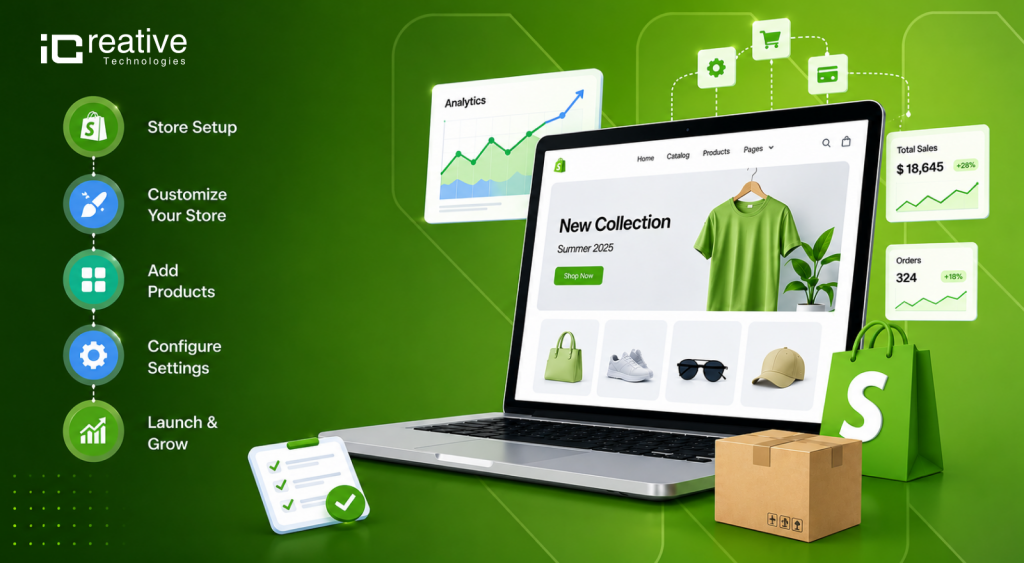
To set up a Shopify store, sign up for an account on Shopify, add your products with details and images, choose and customize a design theme, configure your payment and shipping settings, connect a custom domain, and remove the password to launch your store.
- Create Your Account
- Go to Shopify and enter your email address to start your trial.
- Answer or skip the optional business questions.
- Name your store and access your main admin dashboard.
- Add Products
- Go to Products in your admin menu and click Add product.
- Enter your product title, clear description, and pricing.
- Upload high-quality product images or media files.
- Group related items together by creating Collections.
- Customize Your Store Design
- Navigate to the Online Store and select Themes.
- Browse free or paid templates in the Shopify Theme Store and click Publish on your favorite choice.
- Click Customize to edit your homepage layout, colors, fonts, and announcement bars.
- Upload your brand logo and update your browser favicon.
- Set Up Essential Policies and Navigation
- Create required info pages (like Refund Policy or Contact Us) under Online Store > Pages.
- Build your site header and footer navigation menus under Content > Menus.
- Configure Payments and Shipping
- Go to Settings > Payments to activate Shopify Payments or connect a gateway like PayPal.
- Go to Settings > Shipping and delivery to set your shipping rates and destination zones.
- Launch Your Store
- Connect a custom web domain under Settings > Domains.
- Remove the storefront password under Online Store > Preferences so the public can view your site.
Shopify Theme Customization: A Complete Guide to Setting Up Your Store
Shopify theme library is genuinely very vast and easy to add any Shopify themes.
The free Shopify themes are usable by anyone, but paid Shopify top themes are crystal-cut polished, but for that you need a Shopify Partner in India or Top Shopify agency in India that helps with Shopify theme customization, where a lot of first-time users are lost or dropped. Generally Shopify theme customization is an easy process.
Pick one theme, customize the fonts, color, size, and header, upload the logo, and set up your navigation; that’s where Shopify store is done.
But do not spend 3 days swapping between and developing the perfect one.
If you are in the initial or starting stage, you need to set up just a basic Shopify store, but if you are a large eCommerce business, you can hire Shopify developers or Shopify eCommerce agencies in India.
Note that if visitors can’t find your product categories in 2 clicks with proper SEO planning, you already lose your customers.
Get Your FREE Shopify Store Audit!
Your Shopify store could be losing sales without you realizing it. Get a FREE Shopify Store Audit and uncover SEO issues, conversion gaps, speed problems, UX friction, and practical opportunities to improve your store’s performance.
Shopify Payment Setup and Shopify Shipping Setup: What You Need to Know
This is the section that most Shopify stores break or go into a dangerous situation after the Shopify store is live.
For Shopify payment setup, if you are in India, you will need a 3rd-party payment gateway integration in Shopify like Razorpay, PayU, CCAvenue, or other top payment integrations.
The headache is Shopify Payments system is not available in India yet.
If you are unsure which setup suits your business model, check out top Shopify Plus partners in India that help you to integrate payment architecture and can give you a cleaner starting point.
Set up your gateway, connect your bank account, and place a test order, but it is not as easy as you think. An actual test order with a real card through a real checkout—a surprising number of stores go live with a broken payment flow and don’t find out until customers complain.
In the same way, Shopify shipping setup is either Shopify’s auto setup for beginners or tends to get overwhelming for store owners.
Do not set up your store’s shipping zones to the rest of the world and leave it to the user overwhelming. Calculate what internal shipping actually costs you before you offer it.
Shopify Product & Inventory Setup: Get Your Store Ready to Sell
If you have a small online store and are planning to migrate to Shopify, iCreative Technologies is a trusted Shopify migration agency in India and the USA. Trusted by 280+ brands, we specialize in seamless, SEO-safe Shopify migrations, including large product catalogs, SEO value preservation, 301 redirects, and URL mapping.
Your online store is a revenue machine, and your product pages are your salespersons.
The basic thing you need to clearly title, descriptions, and real questions a buyer has, at least 3 good photos, and price reflecting your positioning.
For Shopify product setup, variants matter more than people think.
If you sell shoes and if you have 3 sizes and 4 colors, that’s 12 SKUs. Each one needs its own inventory count if you are tracking stock, its own weight if shipping is weight-based, and ideally its own photo.
Shopify inventory setup comes with one decision: are you tracking your product inventory or not?
If you’re a small B2C or D2C store owner, every product needs to stay at a specific stock count and continue selling when out of stock decisions. The default is to stop selling when inventory hits zero. It usually happens.
For large businesses managing products across various channels, Shopify and Amazon inventory sync problems are a real pain.
Native sync between 2 platforms is limited. You will likely need a 3rd-party app or need to integrate another Shopify plugin.
That’s where we, as a Shopify app development company, help businesses develop custom Shopify apps and plugins.
Shopify Domain Setup: Get Your Store Ready to Be Found on Google
Connecting a custom domain to your store is one of the last steps before launch, and it is also one of the most common bottlenecks.
Shopify domain setup requires you to update your DNS records with your registered domain. You will point your records to Shopify’s IP and add a CNAME record for the www version. Shopify’s own development documentation clearly walks you through this, but propagation can take up to 48–50 hours.
And you just need to properly document and plan for it.
If your Shopify store is not showing on Google after a few weeks, you need to contact a Shopify store development specialist, and the first thing you need to check is whether your store was accidentally password-protected during setup.
Shopify stores are protected by a password by default. If you do not remove the password before going live, Google cannot crawl and index your store.
Basic SEO also includes page titles, meta descriptions, and clean URLs. Shopify creates URLs automatically, but you should review them before launching your store.
For example, a product URL like /products/blue-cotton-shirt-medium-mens-2024-v2 is not clear or helpful for users or search engines.
Tracking what happens after someone lands on your store is just as important as getting them there. If you haven’t connected Google Analytics 4 yet, the Shopify GA4 Setup: Shopify Expert’s Guide is a good place to start before your first sale comes in.
Businesses that are serious about organic visibility should treat SEO as an important part of their store setup, not something to think about later.
Shopify Store Launch Checklist: Everything to Check Before Going Live
WAIT, check out these things and BEFORE YOU hit live, test your Shopify store checkout and test with real devices, confirm tax settings, payment integration, and verify all shipping rates are calculated properly, and return policy too. Customers check both before buying from a new store.
The Shopify store launch checklist most people use is too often long and focuses on what breaks trust.
| Area | What to Check Before Launch |
|---|---|
| Domain | Connect your custom domain and make sure it is working correctly. |
| Store Design | Check your Shopify theme, logo, fonts, colors, header, footer, and navigation. |
| Products | Verify product names, descriptions, images, prices, variants, SKUs, and inventory. |
| Categories | Make sure products are organized into clear collections and categories. |
| Payments | Test your Shopify payment gateway and make sure customers can complete transactions. |
| Shipping | Configure shipping zones, rates, delivery options, and applicable taxes. |
| Tax Settings | Review your tax configuration based on your target countries and business requirements. |
| Mobile Experience | Test the complete store on mobile devices and different screen sizes. |
| SEO | Check page titles, meta descriptions, URLs, headings, image alt text, canonical settings, and indexability. |
| Google Setup | Connect Google Search Console and Google Analytics and ensure your important pages can be crawled. |
| Checkout | Complete a test order to verify the entire customer journey from product selection to payment confirmation. |
| Legal Policies | Add and review your privacy policy, refund policy, terms and conditions, and shipping policy. |
| Contact Information | Make sure your business name, email, phone number, and contact details are clearly available. |
| Page Speed | Check your Shopify store’s loading speed and optimize large images, unnecessary apps, and other performance issues. |
| Shopify Apps | Remove unused Shopify apps and verify that all required integrations are working correctly. |
| Final Testing | Test links, buttons, forms, search, navigation, cart, checkout, and product pages before going live. |
Shopify Store Setup Timeline: How Long Does It Take?
The Shopify store setup timeline depends on the complexity of your store, the number of products, required integrations, and the level of customization involved.
A basic Shopify store can often be prepared within a few days, while a more complex store with custom functionality, payment integrations, shipping rules, and third-party apps can take several weeks.
Typical Shopify Store Setup Timeline
| Timeline | Setup Stage | Key Tasks |
|---|---|---|
| Day 1–2 | Store Foundation | Create the Shopify store, configure basic settings, select a theme, set up navigation, and configure essential store information. |
| Day 3–5 | Products & Collections | Add products, product descriptions, images, pricing, inventory, variants, collections, and product organization. |
| Day 5–7 | Payments & Shipping | Set up payment gateways, connect required accounts, configure shipping zones and rates, and verify tax settings. |
| Day 7–10 | Store Customization | Customize the theme, homepage, product pages, collection pages, cart, checkout experience, and other important storefront sections. |
| Final Stage | Testing & Launch | Test the store on desktop and mobile devices, place test orders, verify payments, check shipping rates, review policies, test forms, and make sure tracking and analytics are working correctly. |
Shopify Store Setup vs. Shopify Development: Key Differences
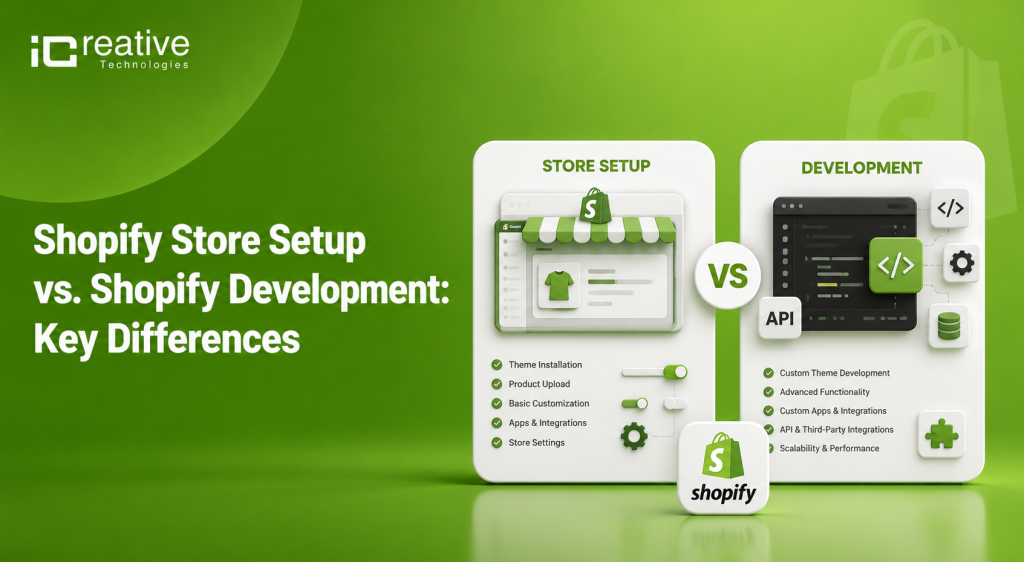
Shopify store setup and Shopify development are not the same thing. Understanding the difference can help you choose the right level of support for your business from Trusted Shopify Development company in India.
| Shopify Store Setup | Shopify Development |
|---|---|
| Creating and configuring your Shopify store | Custom Shopify theme development |
| Selecting and configuring a Shopify theme | Custom sections and storefront features |
| Adding products and collections | Shopify app development |
| Setting up navigation and menus | Custom product functionality |
| Configuring payment gateways | Advanced integrations |
| Setting up shipping and taxes | Custom checkout requirements where supported |
| Adding essential store policies | API and third-party system integrations |
| Connecting your domain | Custom business logic |
| Installing and configuring Shopify apps | Performance optimization |
| Setting up basic analytics and tracking | Complex B2B or wholesale functionality |
iCreative Technologies helps brands move beyond basic Shopify setup with expert Shopify and Shopify Plus development, custom themes, integrations, migrations, CRO, and performance optimization act as full stack Shopify Development Agency in india . The goal isn’t simply to launch a storeit’s to build a scalable ecommerce foundation that can grow with the business.