

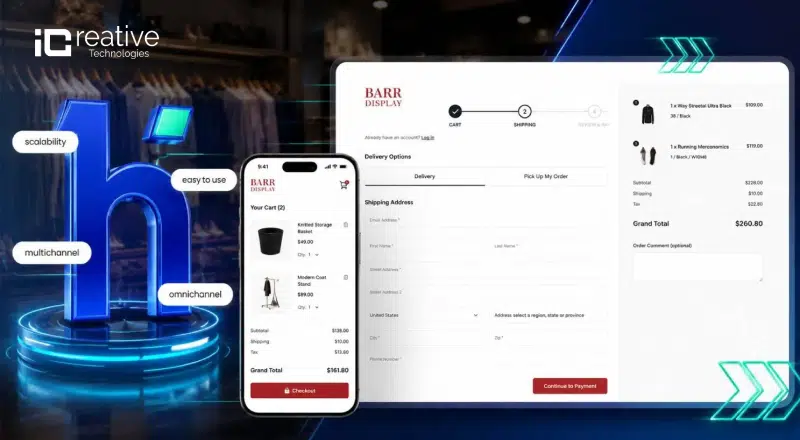
Talk to Magento store owners over coffee, and they’ll eventually vent about checkout abandonment. I’ve literally watched clients stare at their analytics, bewildered as potential customers vanish right before hitting “complete purchase.” The numbers don’t lie – about 70% of shoppers ditch their carts somewhere in that final process. yes.
Let’s be real about the standard Magento 2 checkout – functional? Yes. Perfect? Not even close. It’s like using a flip phone in a smartphone world.
I remember trying various band-aid solutions before stumbling across Hyvä checkout. What makes it different is how seamlessly it works within the whole Hyvä theme ecosystem for Magento 2. Whether you’re already using Hyvä or considering it, a well-executed Hyvä theme development strategy ensures your store benefits from both frontend speed and streamlined checkout. This isn’t just tweaking what’s already there – they’ve completely reimagined how shoppers interact with that make-or-break final step in their buying journey.
Technical Architecture: Why Hyvä Checkout Outperforms Default Magento
For Hyva Theme developers and technical decision-makers evaluating Hyvä Checkout, the performance difference isn’t magic — it’s architecture.
Default Magento 2 checkout loads Knockout.js, RequireJS, and a substantial volume of JavaScript to power its component system. This made sense in 2015. In 2025, it’s overhead that slows checkout and frustrates developers trying to maintain it.
Hyvä Checkout replaces this with:
- Alpine.js handles interactivity with a fraction of the JavaScript weight. Components are declarative and readable — a developer can understand a Hyvä Checkout template without archaeology.
- Tailwind CSS replaces Less-based styling with utility classes that produce smaller stylesheets and predictable output. There’s no cascading specificity hell.
- GraphQL API calls replace older REST calls in many interactions, reducing payload size and improving response times.
- Streamlined templates mean fewer files, fewer overrides, and less surface area for things to break during upgrades.
The result: meaningfully faster page load, faster time-to-interactive, and a checkout experience that doesn’t penalize mobile shoppers for being on a slower connection.
Also Read Top Hyva Theme Specialist & Agencies in 2026!
Explore the vetted list of the best Hyva theme development agencies for 2026, known for their expertise and certifications.
Key Features of Hyvä Checkout That Increase Magento Conversion Rates
When it comes to boosting conversions, the checkout experience is make or break. Hyvä Checkout is purpose built to eliminate friction, reduce drop offs, and guide users effortlessly to purchase.
1. Lightning Fast User Experience for Higher Magento Sales
Speed is perhaps the most immediate benefit customers notice. Research consistently shows that every second of delay in page response results in approximately 7% reduction in conversions. Hyvä Checkout addresses this through:
- Minimal HTTP requests
- Reduced JavaScript execution time
- Efficient data handling
- Optimized rendering
2. Intuitive and Streamlined Magento Checkout Experience
Unlike Magento’s default checkout, Hyvä Checkout offers a seamless, user friendly experience that keeps customers focused and confident throughout the process.
Hyvä Checkout simplifies the purchasing process with:
- Clear progress indicators
- Logical form design and field grouping
- Smart validation that guides rather than frustrates
- Persistent cart visibility
- Optimized guest checkout options
This reduction in complexity helps combat decision fatigue, a key psychological factor in checkout abandonment.
3. Mobile First Magento Checkout Design for Better User Engagement
With mobile commerce continuing to grow, Hyvä Checkout’s mobile optimization provides significant advantages:
- Touch optimized interface elements
- Appropriate keyboards for different input types
- Properly sized and spaced interactive elements
- Orientation flexibility
- Streamlined mobile payment options
These optimizations ensure mobile shoppers enjoy an experience designed specifically for their devices rather than a compromised desktop adaptation.
4. Flexible Payment Integration in Hyvä Checkout for Magento 2
Payment preferences vary widely among shoppers. Hyvä Checkout excels with:
- Seamless digital wallet integration including Apple Pay and Google Pay
- Visual payment method selection
- Region specific payment options
- Buy Now Pay Later service support
- Enhanced security signaling
This flexibility ensures customers can always use their preferred payment method, removing a critical barrier to purchase completion.
A Specialist Hyva theme development company help you to integrate payement methods in hyva theme.
5. Magento 2 Checkout Performance Improvements with Hyvä Checkout
Hyvä Checkout improves your store’s performance by stripping away the clutter and streamlining the checkout experience. It’s built for speed and simplicity, giving customers a faster, more intuitive path to purchase.
Top Rated Mageto Development Agencies like iCreative Technologies, WebPlanet and Amasty are top rated Hyva theme services provider in USA as well as Gloabal stage and with holding Hyva Technology partner certificatios making them top tier Hyva Theme Agency in 2026.
Install Hyvä Theme Magento 2 with Step by Step Guide!
Learn how to install Hyvä Theme in Magento 2 step-by-step.
Hyvä Checkout Implementation Options for Magento 2 Stores
Whether you’re already using the Hyvä theme or just looking to improve your checkout process, there are flexible implementation options to suit your needs.
Hyvä Checkout Integration with Magento 2 Hyvä Theme
For stores already using the Magento 2 Hyvä theme, adding the checkout extension completes the optimization journey with relatively straightforward implementation.
Standalone Hyvä Checkout Implementation for Magento Stores
Hyvä Checkout can be implemented independently of the full Hyvä theme, though some additional configuration may be required.
Magento Checkout Customization and Flexibility with Hyvä
Despite its architectural differences from standard Magento, Hyvä Checkout maintains extensive customization capabilities.
Best Practices for Optimizing Your Hyvä Checkout Implementation
Maximizing the benefits of Hyvä Checkout requires some thoughtful adjustments tailored to your store.
To maximize conversion benefits:
- Analyze your current checkout abandonment data to identify specific pain points
- Implement A B testing when possible to fine tune the experience
- Consider your customer demographics when configuring payment options
- Optimize for mobile first given the growing prevalence of mobile commerce
- Keep customizations focused on business necessities rather than aesthetic preferences
Why Hyvä Checkout Creates a Competitive Advantage for Magento Stores
E commerce is highly competitive and maximizing conversions from existing traffic is essential for growth.
With Hyvä Checkout, your Magento 2 store gains:
- Technical advantage through superior performance
- Customer experience advantage through intuitive design
- Mobile commerce advantage through optimized small screen experiences
- Flexibility advantage through adaptable payment options
Together, these benefits of Hyva Theme create a significant competitive edge in converting browsers into buyers.
Implementing Hyvä Checkout for Your E-Commerce Store
As Hyvä Checkout is just another module for your store, the Hyvä team ensures its quick and easy upload and installation. The comprehensive documentation on that matter and a supportive community will help you even if you face challenges at that stage.
Overall, the Hyvä checkout implementation process looks like this:
To install Hyvä Checkout, you’ll need your Hyvä license key from packagist.com.
1.) Run the command
composer require hyva-themes/magento2-hyva-checkout
2) Disable the Magento HTML minification in the configuration setting
Advanced > Developer > Template Settings > Minify Html, or run
bin/magento config:set dev/template/minify_html 0
This step is only needed if HTML minification is enabled (it is turned off by default).
3) Run the command
bin/magento setup:upgrade
4) Execute tailwind to generate the styles for the checkout, replacing
vendor/hyva-themes/magento2-default-theme/web/tailwind/ with the path to your theme’s web/tailwind folder:
npm –prefix vendor/hyva-themes/magento2-default-theme/web/tailwind/ ci
npm –prefix vendor/hyva-themes/magento2-default-theme/web/tailwind/ run build-prod
Hyvä Themes Magento 2 Hyvä Checkout Stripe Integration Guide
Stripe is one of the most requested payment integrations for Hyvä Checkout, and the implementation is clean when set up correctly.
The integration path for Stripe with Hyvä Checkout runs through the Magento2 Stripe extension by StripeOfficial, which maintains a Hyvä Checkout compatibility module. This isn’t a workaround it’s an officially supported integration with dedicated documentation.
Setting Up Stripe Payments in Hyvä Checkout
Implementing Stripe payments in Hyvä Checkout depends on the checkout version used by your Magento 2 store.
Stripe Integration for Standard Hyvä Checkout (Magewire)
For stores using the standard Magewire-based Hyvä Checkout, Stripe integration is straightforward. Most Stripe payment modules are included in the official Hyvä Checkout Integrations List. Once the compatible Stripe module is installed and activated, it automatically registers within the hyva_checkout_components.xml layout, enabling seamless payment processing during checkout.
Stripe Integration for Hyvä React Checkout
For stores using Hyvä React Checkout, additional configuration is required. The Stripe integration package must be added to your package.json file, and the required Stripe JavaScript libraries, including @stripe/react-stripe-js, must be installed. After installation, project assets should be rebuilt to ensure the Stripe payment functionality works correctly within the React-based checkout experience.
Why Choose iCreative for Your Hyvä Theme Development Project?
iCreative is a trusted Hyvä Theme development company with extensive experience delivering high-performance Magento and Adobe Commerce solutions. Our Magento Development team focuses on building fast, scalable, and conversion-driven eCommerce stores powered by Hyvä.
Particularly, our Hyvä expertise includes:
- Deep knowledge of Hyvä technologies, including Alpine.js, Tailwind CSS, and modern Magento frontend development.
- Extensive experience implementing, customizing, and optimizing Hyvä Theme for Magento 2 stores.
- Proven expertise in developing high-performance eCommerce websites for growing and enterprise businesses.
- Skilled Magento developers focused on Hyvä migration, theme customization, checkout optimization, and speed improvements.
- Experience integrating third-party extensions and custom functionality within Hyvä-powered stores.
- Commitment to delivering faster page load times, better Core Web Vitals, and improved user experiences.