
Preloader

      Magento 2 Performance Optimization Guide: 8 Proven Speed Boosting Tips

      Speed Up Magento 2

      In the age of an ocean full of Magento 2 webshops and ecommerce websites, many store owners feel they are sailing in the same crowded sea. Thousands of Magento stores compete for attention, traffic, and conversions every single day.

      Now imagine this situation.

      You log into your Magento admin panel to update a product description or price. Pages take time to load. You keep switching between tabs while waiting. Managing your store starts feeling slow and frustrating.

      At the same time your customers are visiting your website and your pages are taking 3 to 5 seconds to load. A slow Magento store does not just frustrate you as a store owner. It also pushes potential buyers away. Studies show that even a few seconds of delay can increase bounce rate and reduce conversions significantly.

      A delay of 3 to 5 seconds can cost you valuable customers who were ready to purchase from your store.

      But what if you could speed up Magento 2 store performance with a few proven optimization techniques? The good news is that Magento 2 speed optimization is possible when the right technical improvements are implemented.

      As a Certified Magento Solution Partner and a trusted Magento development company in the USA and India, iCreative Technologies has been working with Magento and Magento Hyva themes for more than 11 years. Our team has helped more than 280+ businesses improve performance, fix slow loading issues, and build fast Magento stores that convert visitors into customers.

      In this complete guide on Magento 2 Performance Optimization Guide: 8 Proven Speed Boosting Tips, you will learn practical strategies to speed up Magento 2 store performance, improve page loading time, and create a smoother shopping experience for your customers including checkout optimization.

      Let us get started.

      Is Your Magento Store Fast Enough?

      If not, let’s unlock hidden speed opportunities!

      Why Should You Speed Up Your Magento 2 Store? Real World Case Study?

      Magento 2 speed optimization is not just a technical improvement done by developers. It directly affects how customers interact with your store, how long they stay on your pages, and whether they complete a purchase or leave.

      A slow loading ecommerce website creates friction at every stage of the buyer journey. Customers expect pages to load instantly when they browse products, add items to cart, or proceed to checkout. If your Magento store takes several seconds to respond, many visitors simply abandon the page and move to another website.

      This is why businesses investing in Magento 2 speed optimization often see improvements in conversion rate, customer engagement, and overall revenue.

      To understand the real impact of website speed, let us look at a few real world examples from well known companies that improved performance and saw measurable results.

      Akamai Conversion Rate Study

      Website speed has a measurable impact on ecommerce performance, especially on mobile devices where users expect instant loading experiences. A well known study by Akamai analyzed mobile conversion rates over a 30 day period and found a clear relationship between page load time and customer actions.

      According to Akamai, pages that loaded in around 2.4 seconds achieved the highest mobile conversion rate of about 1.9 percent during the study period.

      The research also revealed how quickly conversions decline as page speed slows down.

      • At 3.3 seconds the conversion rate dropped to around 1.5 percent
      • At 4.2 seconds the conversion rate fell below 1 percent
      • At 5.7 seconds or more the conversion rate dropped to only 0.6 percent

      This data clearly shows that faster websites create more opportunities for purchases. When Magento store owners invest in Magento 2 speed optimization, they are not just improving performance metrics. They are increasing the chances that visitors will complete a purchase.

      Pinterest Shows Improvements Across the Board

      Pinterest provides another strong example of how performance improvements influence growth metrics. The company rebuilt parts of its website with a strong focus on speed and performance.

      After optimizing their pages, Pinterest achieved several major improvements.

      • User wait time decreased by about 40%
      • Search engine traffic increased by 15%
      • Conversion rate for new sign ups increased by 15%

      Pinterest growth engineers Sam  Meder, Vadim Antonov, and Jeff Chang explained that these improvements created a powerful multiplier effect. More search traffic combined with higher conversion rates resulted in a significant increase in new users joining the platform.

      For Magento store owners, the lesson is simple. Faster pages can improve both SEO visibility and conversion rates at the same time.

      Mobify

      Mobify conducted performance experiments with ecommerce pages and found that improving page speed resulted in higher conversion rates and greater average order value. Customers were more likely to continue shopping when pages responded quickly.

      Netflix Optimizes JavaScript for Faster User Experience


      Netflix
      focused on improving the performance of its website by optimizing how JavaScript was used in the sign up process. The engineering team refined scripts and introduced prefetching techniques to improve navigation speed.

      After implementing these improvements, Netflix reported major performance gains.

      Page loading time and interactive response time decreased by around 50 percent JavaScript bundle size was reduced by about 200 kilobytes Prefetching important resources improved future page interaction time by about 30 percent,

      What These Case Studies Teach Magento Store Owners?

      These examples highlight a simple truth. Website speed has a direct impact on business results.

      For Magento store owners, investing in Magento 2 speed optimization is not just about technical performance. It is about improving customer experience, increasing engagement, and ultimately growing revenue.

      Now that we understand the impact of performance on real businesses, the next step is to identify what exactly should be optimized in order to speed up Magento 2 store performance. In the following section we will explore the practical steps that help improve Magento website speed and overall performance.

      What is Magento 2 Performance Optimization?

      Speed Up Magento 2

      Magento 2 performance optimization involves a holistic approach covering hosting, server configuration, coding practices, and front-end optimization. Key strategies aim to reduce page load times and improve server response time (TTFB), which in turn enhances user experience, SEO rankings, and conversion rates.

      Why You Need Magento 2 Performance Optimization?

      Speed isn’t just a technical metric — it’s a direct driver of revenue.

      According to Source of SpeedMage, the probability of a visitor bouncing increases by 32% when page load time rises from 1 second to 3 seconds. That means if your Magento store is even slightly slow, you’re already losing potential customers before they see your products.

      Performance research also shows that the ideal load time for the lowest bounce rate falls between 700 milliseconds and 1.2 seconds. When it comes to conversions, the sweet spot is between 1.8 and 2.7 seconds. Anything beyond that? You’re giving your competitors an advantage.

      Let’s talk revenue impact:

      • Almost 70% of consumers say page speed influences their decision to buy from an eCommerce website.
      • Every 100-millisecond delay in page load time can reduce conversion rates by 7%.
      • A website that loads in 1 second converts 3× higher than a site loading in 5 seconds and 5× higher than one loading in 10 seconds.

      That’s not a minor performance issue. That’s lost revenue.

      So without waiting more lets shift on how should you optimized your magento 2 store.

      Magento Speed Tip #3: Delete All Unused Data in Magento Datalog


      How to Optimize your Magento Store.

      Below are 8 simple tips to optimize and speed up your magento store.

      • Keep Your Magento Updated
      • Delete All Unused Data in Magento Datalog
      • Set Up a Content Delivery Network (CDN)
      • Optimize Your Images
      • Enable Varnish Cache
      • Use Full Page Cache (FPC)
      • Enable Expire Headers for Browser Caching
      • Choose a Trusted Hyva theme or Magento Hosting Provider

      How to Optimize Your Magento 2 Store Speed Performance

      Before implementing any Magento 2 speed optimization strategy, the first and most important question you should ask is this. Are you still running Magento 1?

      This guide focuses on improving Magento 2 store performance, but a surprising number of ecommerce businesses are still operating on Magento 1. Even today thousands of merchants continue to use it despite the fact that Adobe officially ended support for Magento 1 in June 2020.

      Running a Magento 1 store today creates several serious challenges that directly impact security, performance, and long term scalability.

      So without waiting more lets shift on how should you optimized your magento 2 store.

      Magento Speed Tip #3: Delete All Unused Data in Magento Datalog


      How to Optimize your Magento Store.

      Below are 8 simple tips to optimize and speed up your magento store.

      • Keep Your Magento Updated
      • Delete All Unused Data in Magento Datalog
      • Set Up a Content Delivery Network (CDN)
      • Optimize Your Images
      • Enable Varnish Cache
      • Use Full Page Cache (FPC)
      • Enable Expire Headers for Browser Caching
      • Choose a Trusted Hyva theme or Magento Hosting Provider

      How to Optimize Your Magento 2 Store Speed Performance

      Before implementing any Magento 2 speed optimization strategy, the first and most important question you should ask is this. Are you still running Magento 1?

      This guide focuses on improving Magento 2 store performance, but a surprising number of ecommerce businesses are still operating on Magento 1. Even today thousands of merchants continue to use it despite the fact that Adobe officially ended support for Magento 1 in June 2020.

      Running a Magento 1 store today creates several serious challenges that directly impact security, performance, and long term scalability.

      Here are some important points every Magento store owner should know.
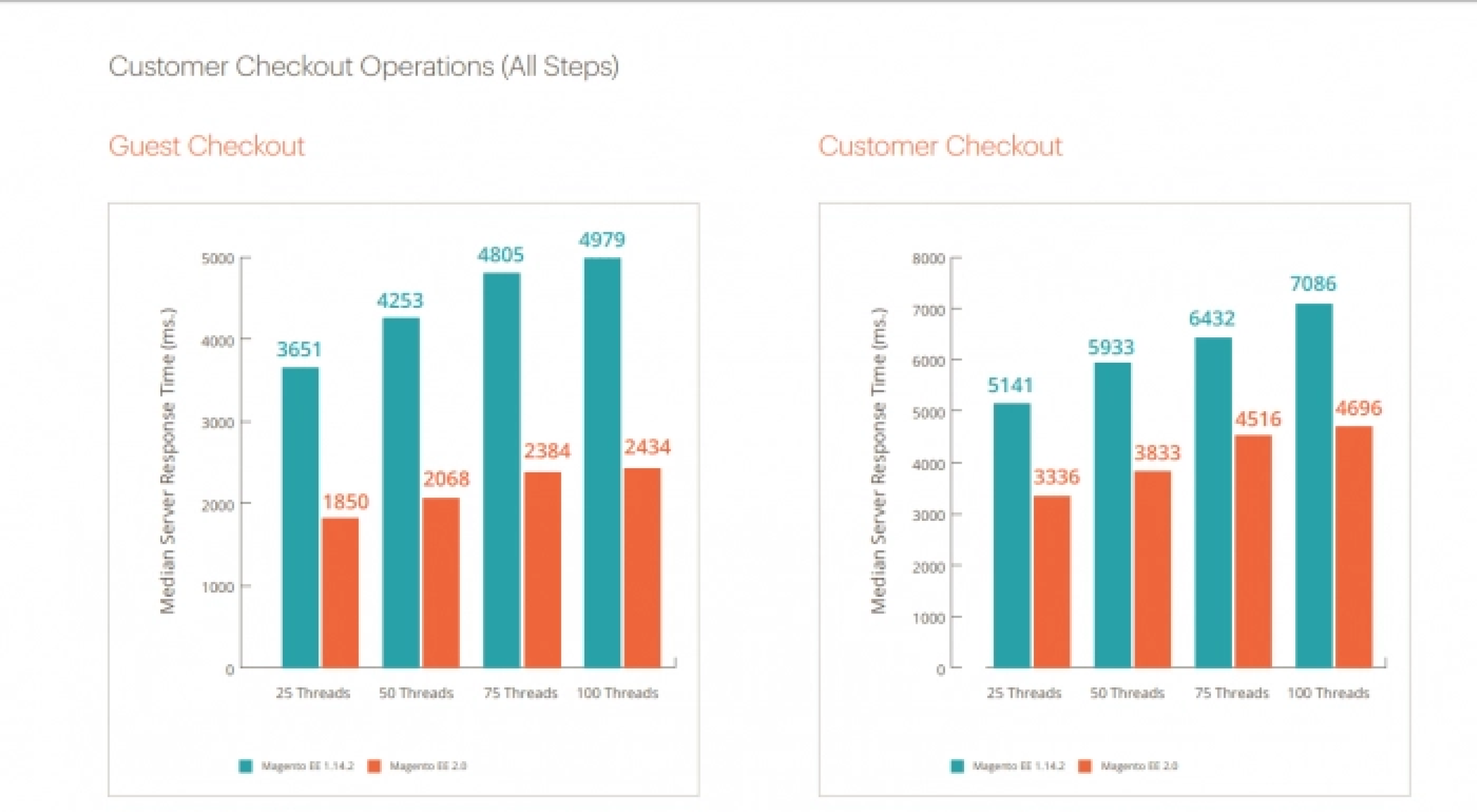
      Facts about Magentoi 2 Speed Optimization

      • Running outdated or poorly optimized systems can expose your store to security risks, leading to blacklisting by payment gateways and loss of customer trust.
      • You may also miss major performance benefits Magento 2 is built for speed, handling more orders, faster checkouts, and near-instant page loading.
      • Most modern extensions are built for Magento 2, while Magento 1 plugins are now outdated and often incompatible.
      • Magento 2 delivers up to 39% more orders per hour and handles high traffic efficiently.
      • Enjoy near-instant catalog page loading for faster product browsing.
      • Magento 2 enables up to 66 percent faster add to cart response time, often responding in under 500 milliseconds.
      • Checkout performance is also significantly improved with around 51 % faster response time and overall 37 % faster system responsiveness when these improvements work. together.

      Magento Tip 1 : Migration to Magento 2

      One of the most effective Magento 2 performance optimization strategies is to always run your store on the latest Magento version.

      Why Updating Magento Matters

      • Performance Enhancements: Each release includes optimized code and improved system efficiency to reduce load times.

      • Security Patches: Protect your store from vulnerabilities and potential cyber threats.

      • Optimized Backend Logic: Improved processes ensure faster data handling and smoother operations.

      • Better Frontend Experience: Faster page rendering leads to improved user experience and engagement.

      Key Benefits to Update to Magento 2

      • Faster website speed
      • Improved stability and reliability
      • Higher conversion rates
      • Enhanced security and compliance

      Magento Speed Tip #2: Follow Magento Performance Optimization Best Practices

      Magento 2 documentation includes a dedicated section called Performance Best Practices that covers useful tips, hardware and software recommendations, and configuration guidelines to help improve store performance.

      We understand that the documentation can feel overwhelming for many store owners. That is why we are sharing some practical Magento tricks and quick fixes that you can start implementing today. These recommendations are carefully selected by our Magento development team based on real store optimization experience.

      1) Enable Full Page Caching and Use Varnish

      Magento recommends enabling all cache types from the System > Tools > Cache Management section in the admin panel.

      Magento also strongly recommends using Varnish Cache. Varnish is an open source web application accelerator that helps reduce server response time and lower bandwidth usage by serving cached content quickly to visitors.
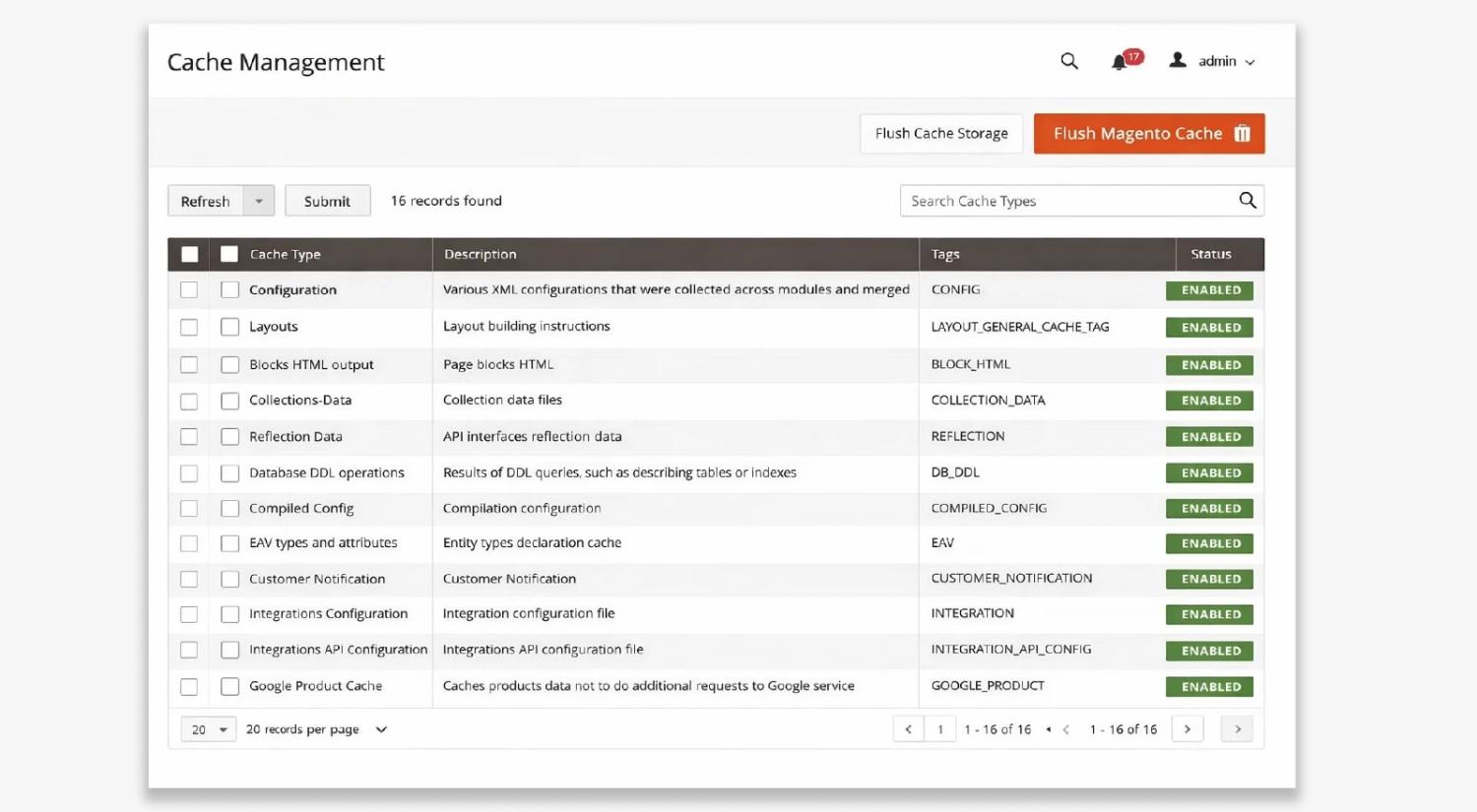
      Pro tip: If your hosting provider does not support Varnish, you can still improve performance by using a CDN such as Cloudflare. A CDN helps handle part of the caching and delivers your website content faster to users across different locations.

      Full Cache


      Tip #3: Delete All Unused Data in Magento Datalog


      Over time Magento databases start collecting unnecessary data such as old logs, outdated product records, and unused system entries. This extra data increases the load on database queries and slows down server response time.

      Regularly cleaning unused data from the Magento datalog keeps the database lighter and improves overall processing speed. It is a simple but effective step to speed up Magento 2 store performance.

      Tips #4 : Choose a Trusted Magento Hosting Provider


      Your hosting environment plays a major role in Magento store performance. Magento requires optimized server configuration, the right PHP version, and well tuned databases to perform efficiently.

      • Admin panel performance: If your store has a large product catalog, allocate at least 1GB memory for each web node to keep the Magento admin panel running smoothly.

      • Cron indexing for large catalogs: Cron indexing usually requires at least 256MB of memory. Proper configuration and tuning help maintain faster indexing and better store performance.

      • Static asset deployment: Deploying static files such as CSS, JavaScript, and images requires around 756MB of memory to process smoothly.

      • Database tuning: For better database performance, allocate MySQL memory equal to at least half the size of your total stored data. This helps speed up indexing and database queries.

      Looking for the Best Magento Development Company for Your Store?

      Build a faster and scalable Magento store with expert developers. Explore List of Magento Development Companies in India for 2026.

      Types of Magento Hosting Options


      1) Shared Server Hosting A beginner’s best friend

      Shared hosting means your website is placed on a server that hosts many other websites at the same time. It is a good option for beginners who are just starting their online store.

      2) Virtual Private Server VPS Hosting Shared hosting with more power

      VPS hosting works similar to shared hosting because multiple websites are still hosted on one physical server. However each website gets its own virtual environment with dedicated resources.

      3) Dedicated Server Hosting Enterprise level hosting

      Dedicated hosting means you get an entire server only for your website. The biggest advantage is complete control over the server configuration and resources.

      4) Cloud Server Hosting Modern web hosting solution

      Cloud hosting works similar to VPS hosting but instead of relying on a single server, your website runs on a network of connected servers. This setup improves reliability and scalability because resources can be increased easily when traffic grows.

      Cloud hosting is a good choice if you want faster performance and the ability to scale your Magento store quickly. Popular cloud hosting providers include Amazon Web Services and DigitalOcean.

       Tip #5 : Use Full Page Cache

      Magento comes with a built-in Full Page Cache feature that stores ready to load HTML versions of your store pages. When a visitor opens the same page again, Magento delivers the cached version instead of processing the request from the server every time. This reduces database queries and lowers the workload on the backend.

      As a result your pages load faster and users get a smoother browsing experience.

      Pro Tip: You can enable Full Page Cache from the Magento admin panel by going to Stores > Configuration > Advanced > System > Full Page Cache and selecting the appropriate caching option for your store setup.

      Tip #6 : Set Up a Content Delivery Network (CDN)

      A Content Delivery Network CDN distributes your images, CSS, JavaScript, and other media files across multiple servers. Instead of relying on a single server to deliver all content, the files are served from the server that is closest to the user location. This helps reduce loading time and improves overall Magento 2 speed optimization.

      Magento 2 already supports CDN integration, but it is not always fully configured by default. Store owners still need to properly complete the Magento CDN setup to make sure static files such as images, CSS, and JavaScript are delivered through the CDN network.

      How do you speed up Magento 2 with CDN

      A Content Delivery Network helps speed up Magento 2 store performance by delivering images, CSS, JavaScript, and media files from servers closer to the visitor location. This reduces server load and improves page loading speed.

      Follow these steps to configure Magento 2 CDN properly.

      Step 1. Update Magento Base URLs for CDN

      Go to your Magento Admin Panel.

      • Navigate to Stores → Configuration → Web → Base URLs
      • Update these fields with your CDN URL.
      • Base URL for Static View Files
      • Base URL for User Media Files

      If your store runs on HTTPS, update the same fields under Base URLs Secure.

      This allows Magento to load static assets through the CDN network instead of your origin server.

      2. Enable CDN Caching

      Enable caching for static assets such as

      • Images
      • CSS files
      • JavaScript files
      • Media files

      Proper caching keeps these files stored on CDN servers and reduces repeated requests to your main Magento server. This is an important step in Magento 2 speed optimization.

      3. Use Fastly or Cloudflare for Better Magento CDN Optimization

      Magento recommends Fastly for Adobe Commerce because it provides

      • Edge level caching for faster page delivery
      • Security protection from DDoS attacks and bots
      • Faster dynamic content delivery for checkout and APIs

      Other reliable CDN providers include Cloudflare, Amazon CloudFront, and Akamai. These networks help speed up Magento 2 store performance for global users.

      4. Configure Your Web Server for CDN

      • Your web server also needs to support CDN delivery.
      • Apache users should configure the .htaccess file for proper asset loading.
      • Nginx users should update nginx.conf to allow static file delivery through the CDN.

      Tips #7 : Optimize Your Images

      Images are one of the biggest contributors to page weight on an ecommerce website. Large image files can slow down your Magento store significantly.

      Best Practices for Image Optimization

      • Use modern formats: Prefer WebP or compressed JPEG for smaller file sizes
      • Resize before upload: Always match image dimensions to display size instead of scaling via CSS
      • Compress images: Reduce file size while maintaining visual quality
      • Audit regularly: Identify heavy images using tools like Google PageSpeed Insights or Screaming Frog SEO Spider

      Tips #8 : Implement Lazy Loading

      Lazy loading is a performance optimization technique that loads images and media only when they enter the user’s viewport.

      Instead of loading all page elements at once, Magento prioritizes visible content first and delays off-screen elements until they are needed.

      Every Second Counts: How to Know if Your Magento Website Is Slow

      One of the biggest myths about website speed is this.

      “My website loads fast for me, so it must load fast for everyone.”

      In reality, Magento 2 speed optimization does not work that way.

      Your Magento store performance depends on several factors such as server location, user device, browser type, internet connection, and caching status. A store that loads quickly on your computer may load much slower for customers in another city or country.

      This is especially true for mobile users. Many ecommerce visitors today browse and shop from smartphones using different network speeds.

      So instead of guessing whether your store is fast or slow, the best approach is to test it using reliable performance testing tools.

      Use Google PageSpeed Insights to Test Magento Store Speed
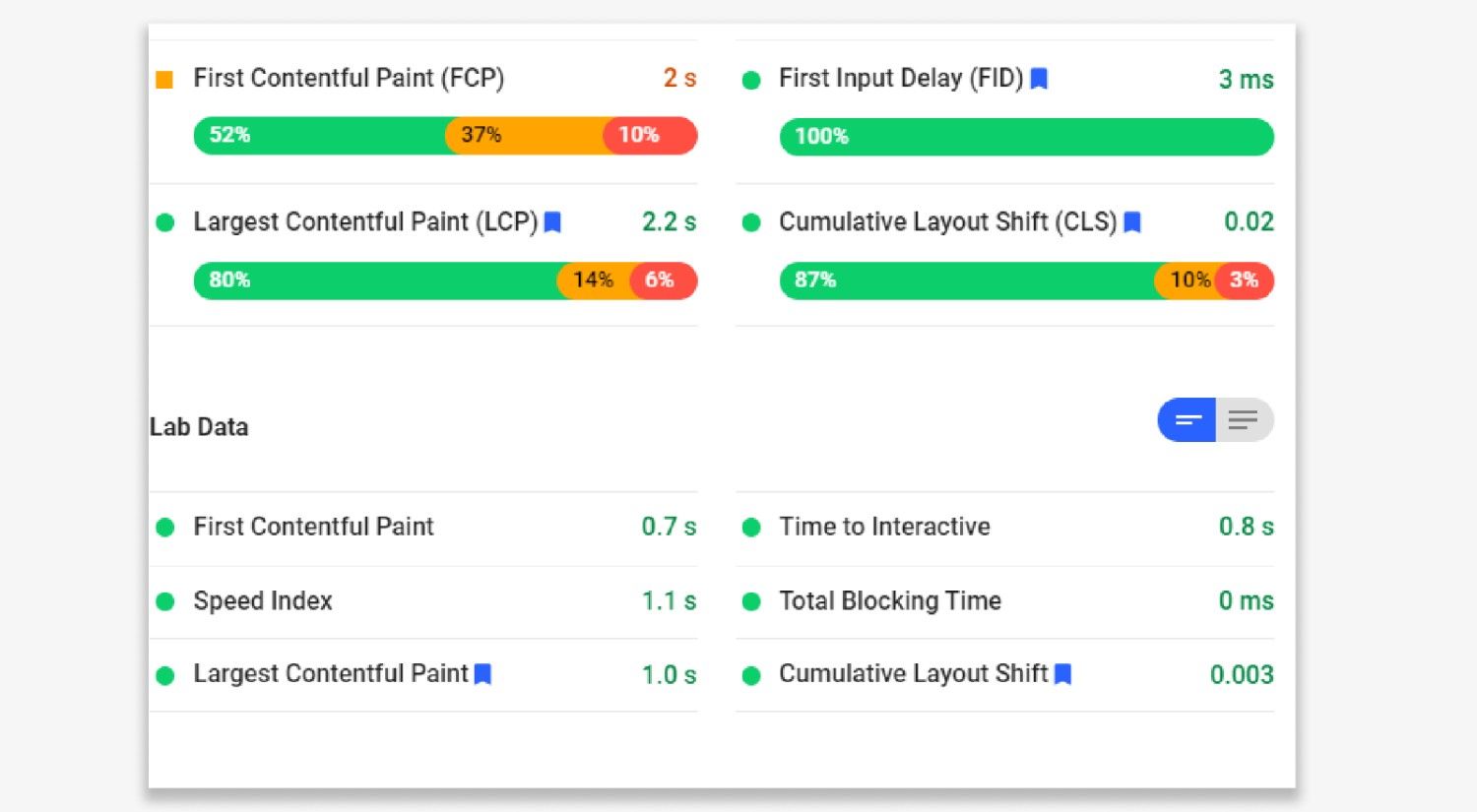
      Google Page  speed insights

      Google PageSpeed Insights is one of the most reliable tools to analyze Magento 2 store performance on both mobile and desktop devices. It evaluates your website URL and provides a performance score along with technical suggestions to improve loading speed.

      Here is how to understand the PageSpeed Insights score.

      Score RangePerformance Status
      90 and aboveFast website performance
      50 to 89Needs improvement
      Below 50Your Magento store is slow and requires optimization


      Understanding Magento Speed Metrics in PageSpeed Insights

      When you scroll down the report, PageSpeed Insights shows detailed performance metrics such as page loading time, render speed, and user experience indicators.

      It also provides two important sections.

      • Opportunities – These are recommended improvements that can help speed up Magento 2 store performance.

      • Passed audits – These indicate optimizations that your Magento store has already implemented correctly.

      Regularly testing your store with this tool helps identify performance bottlenecks and is an essential step in any Magento 2 speed optimization strategy.

      Test Magento Store Performance with GTmetrix
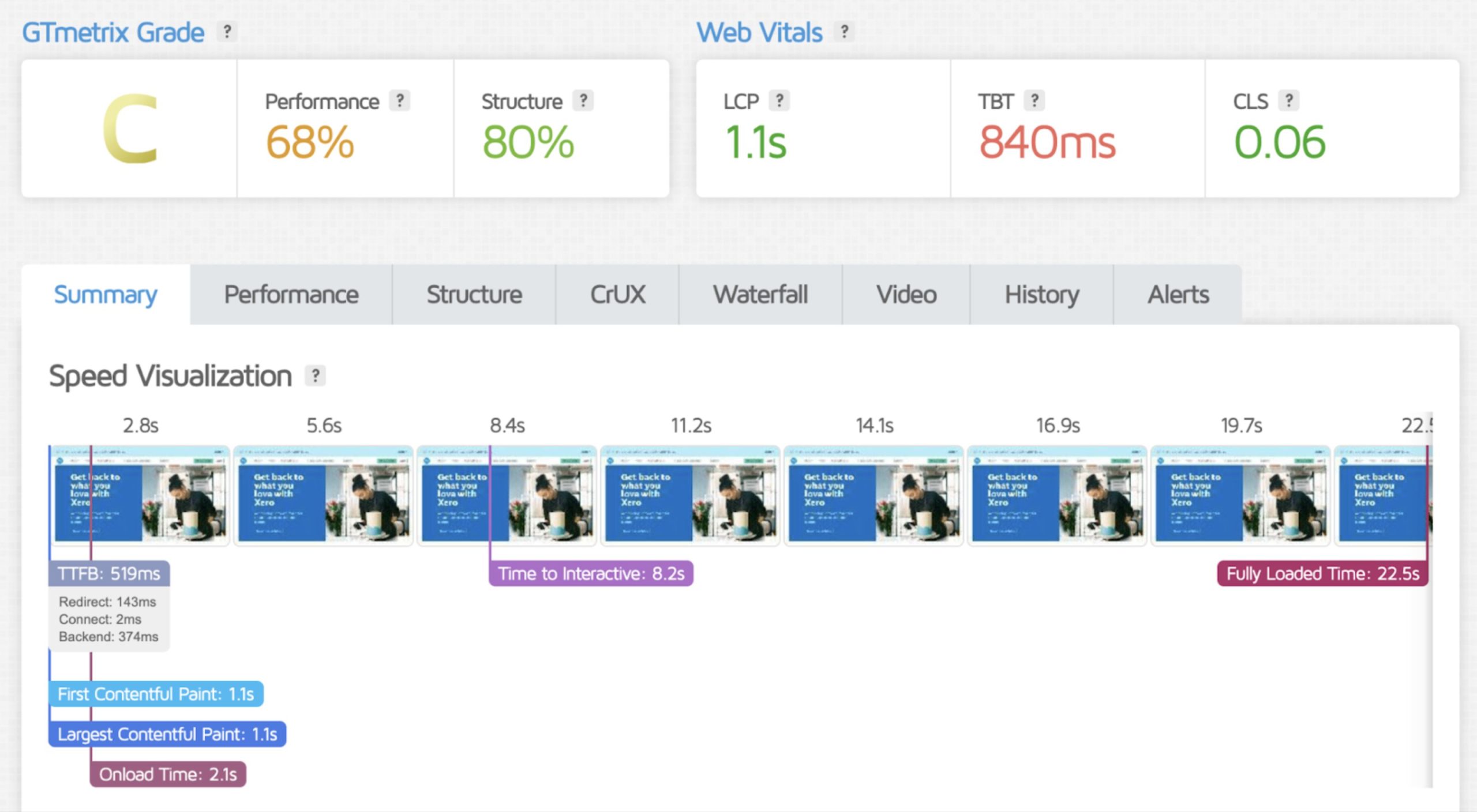
      GTMatrix

      Another powerful tool to analyze Magento 2 speed optimization is GTmetrix. It provides deeper insights into how your Magento store loads and what elements are slowing it down.

      While Google PageSpeed Insights focuses more on performance scores and Core Web Vitals, GTmetrix gives a more technical breakdown of how each resource loads on your website.

      What GTmetrix Helps You Analyze

      GTmetrix provides several important performance indicators for your Magento store.

      • Performance Score: Measures overall website efficiency based on Google Lighthouse metrics

      • Page Load Time: Time taken for a page to fully load for users

      • Total Page Size: Total weight of the page including images, scripts, and stylesheets

      • Number of Requests: Total files required to load the page (CSS, JS, images)

      Conclusion

      Investing in speed optimization today ensures your Magento store remains scalable, secure, and ready to handle growing customer demands in the future.

      If you’re looking for a trusted Magento development company in USA, iCreative Technologies is a reliable choice for expert and  certified Magento development services and solutions, including specialized Hyvä theme development.

      FAQs

      Magento Speed Performance Optimization is the process of improving your Magento store’s loading time, server response speed, and Core Web Vitals through caching, CDN setup, database optimization, hosting improvements, and frontend enhancements like Hyvä Theme development.

      Hyvä Theme is lightweight and removes Magento’s heavy JavaScript dependencies like KnockoutJS and RequireJS. This results in faster page rendering, improved Core Web Vitals, better mobile performance, and overall superior Magento Speed Performance Optimization compared to Luma.

      Luma to Hyvä Migration replaces the default heavy frontend architecture with a streamlined, performance-first framework. This reduces code bloat, speeds up load times, and enhances user experience without affecting backend functionality.

      A Hyvä Theme Development Specialist ensures proper implementation, compatibility handling, custom checkout optimization, and performance tuning. Working with experts like iCreative Technologies guarantees stable migration, optimized frontend performance, and long-term scalability.

      Far far away, behind the word mountains, far from the countries Vokalia and Consonantia, there live the blind texts. Separated they live in Bookmarksgrove right at the coast

      Related Blogs

      Pros And Cons Of The Hyvä Themes For Magento 2

      Pros And Cons Of The Hyvä Themes For Magento 2

      The eCommerce market is growing fast, but so are customer expectations. People […]

      Magento 2 Performance Optimization Guide: 8 Proven Speed Boosting Tips

      Magento 2 Performance Optimization Guide: 8 Proven Speed Boosting Tips

      In the age of an ocean full of Magento 2 webshops and […]

      Installing Hyvä Theme in Magento 2: The Complete Step-by-Step Guide.

      Installing Hyvä Theme in Magento 2: The Complete Step-by-Step Guide.

      If you’ve been running a Magento store on Luma or Blank theme, […]